Your VixxoLink dashboard is the home base for open service requests, billing action items, and payment tracking. Access it anytime by clicking the Vixxo logo in the top-left corner. This guide explains each dashboard section so you can quickly find work that needs attention and monitor invoice and payment status.
*If you are stuck and need assistance, please call 866-988-5376 — Option 1 for invoices already submitted (payment status), Option 2 for help submitting an invoice or quote, Option 3 for VixxoLink technical support, Option 4 for dispatch/service-request questions — or click the Submit a Ticket button at the top right.
Action Required & Problem Statuses
This section lists service requests that need action from your team. Click a category to open the matching queue.
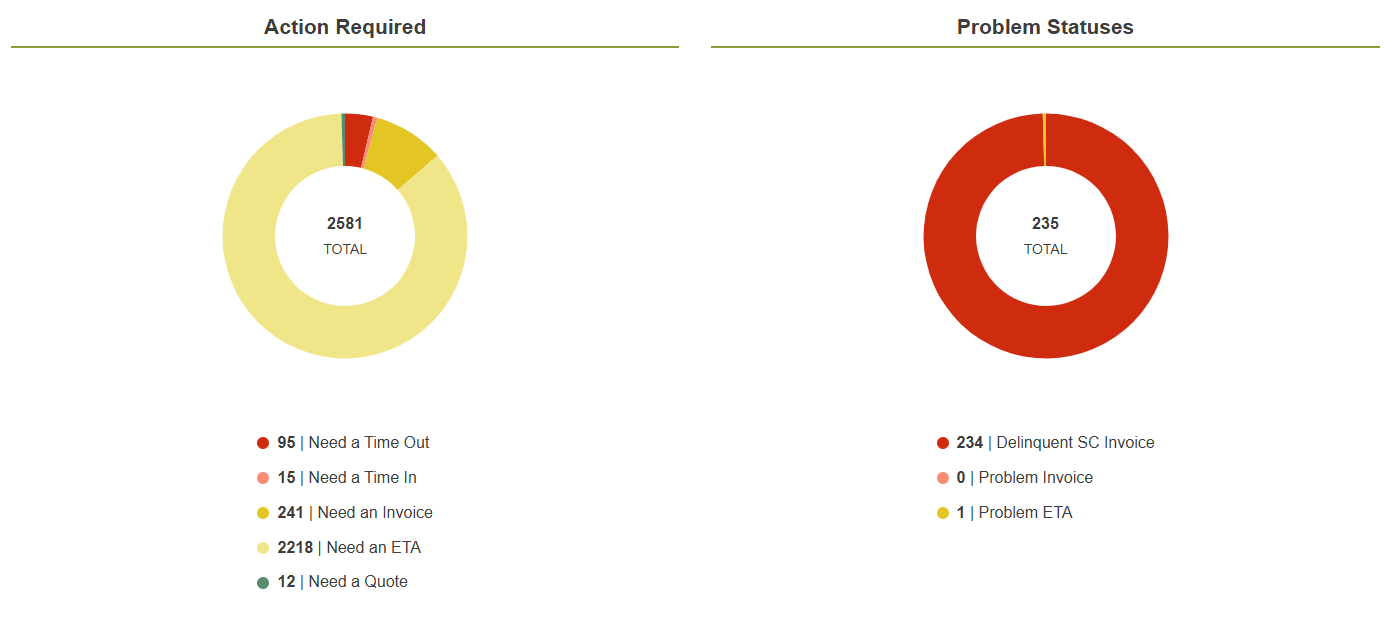
- Need a Time Out — Service requests showing a technician on site. If incorrect, ensure a time out is recorded through the service center.
- Need a Time In — An ETA is set and Vixxo is awaiting technician arrival. If incorrect, ensure a time in is recorded through the service center.
- Need an Invoice — The service request is complete and pending an invoice. Submit within 5 days of completion.
- Need an ETA — Assigned service requests requiring an ETA or return ETA after quote approval.
- Need a Quote — Service requests needing a quote submitted.
- Delinquent SC Invoice — Completed more than 5 days ago without an invoice. Payment terms begin upon receipt of the invoice.
- Problem Invoice — The invoice was rejected. Check your email for details and contact aphelp@vixxo.com if needed.
- Problem ETA — An ETA was missed; urgent updates or time in/out corrections are needed.
Quick Links
Quick links surface items that may not appear in Action Required but still need monitoring.
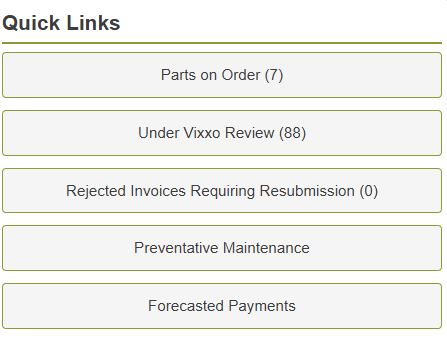
- Parts on Order — Service requests flagged as awaiting parts. Update with an ETA once parts arrive.
- Under Vixxo Review — Invoices submitted and pending Accounts Payable review.
- Rejected Invoices Requiring Resubmission — Rejected invoices awaiting correction and resubmission. Check email for rejection details.
- Preventative Maintenance — All open preventative maintenance service requests.
- Forecasted Payments — Accepted invoices with expected payment dates.
Recent and Upcoming Payments
This section helps you track payables at a glance.

- Forecast — Expected payment amounts within the displayed date range.
- Payment in Process — Payments being processed for the current week. A blank box means no payments are scheduled.
- Paid — Amount and date of your most recent payment.
For detailed payment lookup, filtering, and export, see Reviewing Payments.
Quick Reference — Dashboard Categories
| Category | What it means | Typical action |
|---|---|---|
| Need an Invoice | Job complete, no invoice submitted | Submit invoice within 5 days |
| Delinquent SC Invoice | Completed >5 days ago, still no invoice | Submit invoice immediately |
| Problem Invoice | Invoice rejected by AP audit | Review rejection email; correct and resubmit |
| Under Vixxo Review | Invoice submitted, pending review | Monitor; respond to AP requests if contacted |
| Forecasted Payments | Invoice approved, payment scheduled | Check expected pay date |
| Need a Quote | Quote required before repair work | Submit quote within 24 hours of initial visit |
| Need an ETA | Dispatch waiting for arrival date/time | Set or update ETA in VixxoLink |
Related articles:
Was this article helpful?
That’s Great!
Thank you for your feedback
Sorry! We couldn't be helpful
Thank you for your feedback
Feedback sent
We appreciate your effort and will try to fix the article